
Select Your Region
Region-Based Optimized Content
Sanity CMS vs Webflow: Which Platform Is Better for Scalable Websites in 2026?
Compare Sanity CMS vs Webflow to understand which platform is better for scalable websites in 2026. Explore architecture, performance, customization, SEO capabilities, and long-term scalability.


Choosing the right platform for a website is a critical strategic decision, impacting not only immediate development but also long-term scalability, performance, and operational efficiency. As digital demands intensify, businesses must evaluate solutions that can evolve with their needs, particularly when considering content-rich and high-traffic applications. This comparison between Sanity CMS and Webflow aims to provide a clear framework for decision-makers, product leaders, and development teams assessing their options for scalable websites in 2026 and beyond.
We will delve into the architectural differences, content management capabilities, performance implications, customization potential, and overall scalability of each platform. Understanding these distinctions is crucial for aligning your technology stack with your business objectives, ensuring your digital presence remains robust, adaptable, and future-ready.
Understanding Sanity CMS and Webflow Architectures
The fundamental architectural differences between Sanity CMS and Webflow dictate their strengths and limitations, especially concerning scalability and flexibility.
Sanity CMS: The Headless Content Platform
Sanity CMS operates as a headless content platform, meaning it provides a structured content repository and API layer, entirely decoupled from the presentation layer. Content is managed within Sanity's Studio, a customizable React-based editor, and then delivered via GraphQL or REST APIs to any frontend framework (React, Vue, Next.js, Gatsby, etc.), mobile app, or IoT device. This headless architecture offers unparalleled flexibility in how content is consumed and displayed.
Key characteristics of Sanity's architecture include:
Content-First Approach: Focuses solely on content creation, structuring, and delivery, making it highly efficient for managing diverse content types.
API-Driven: All content interactions happen through APIs, enabling multi-channel delivery and integration with various services.
Frontend Agnostic: Allows developers to choose any modern frontend technology, optimizing for specific performance or user experience requirements.
Structured Content: Emphasizes structured content modeling, enabling highly reusable and queryable data.
Webflow: The Visual Development Platform
Webflow is an all-in-one visual development platform that combines design, content management, and hosting. It provides a drag-and-drop interface for designing responsive websites without writing code, while also offering a CMS for managing dynamic content. Webflow generates clean, semantic HTML, CSS, and JavaScript, and hosts the websites on its global CDN.
Key characteristics of Webflow's architecture include:
Integrated Design & CMS: Blends visual design with content management within a single environment.
No-Code/Low-Code: Empowers designers and marketers to build and launch websites without extensive coding knowledge.
Managed Hosting: Includes built-in hosting, SSL, and CDN, simplifying deployment.
Template-Based & Visual: Relies heavily on visual builders and templates, streamlining the initial development process.
Content Management and Flexibility
The approach to content management significantly impacts how efficiently teams can operate and how adaptable a platform is to evolving content needs.
Sanity CMS: Unrestricted Content Modeling and Multi-Channel Delivery
Sanity CMS excels in providing a highly flexible and programmatic approach to content. Its core strength lies in its ability to define custom content schemas with a high degree of granularity. Teams can model complex relationships between content types, create reusable components, and structure content for diverse applications beyond just a single website.
Custom Content Schemas: Developers can define any content structure using JavaScript, allowing for deeply nested fields, arrays, and references. This is crucial for complex data models in large-scale applications.
Real-time Collaboration: Sanity Studio offers real-time collaboration features, version history, and granular access controls, supporting large editorial teams.
Rich Text Editor (Portable Text): Sanity's Portable Text specification allows for highly structured and semantic rich text, which can be rendered consistently across different frontends.
Multi-channel Publishing: Content stored in Sanity is readily available via APIs for websites, mobile apps, smart displays, and other digital experiences, making it ideal for an omnichannel strategy.
Localization & Internationalization: Supports advanced patterns for managing localized content variations, a key requirement for global businesses.
Webflow: Visual CMS for Website-Specific Content
Webflow's CMS is designed to be intuitive for managing website-specific content. It allows users to create collections (like blog posts, products, or team members) and populate them directly within the visual editor. While powerful for its intended scope, it has limitations compared to a dedicated headless CMS.
Collection-Based Content: Content is organized into "Collections" with predefined fields, which are then dynamically displayed on website pages using visual binding.
User-Friendly Interface: The editor is highly visual and accessible to non-technical users, enabling quick content updates directly on the live site.
Website-Centric: Primarily geared towards managing content for the Webflow-hosted website. While it offers an API, its primary strength isn't multi-channel content delivery.
Limited Content Modeling Depth: Content modeling is less flexible than Sanity, with simpler field types and more restrictive relationships between collections. This can become a bottleneck for highly complex data structures.
Performance and Scalability Considerations
For scalable websites, performance and the ability to handle increasing traffic and content volume are paramount. The architectural differences play a significant role here.
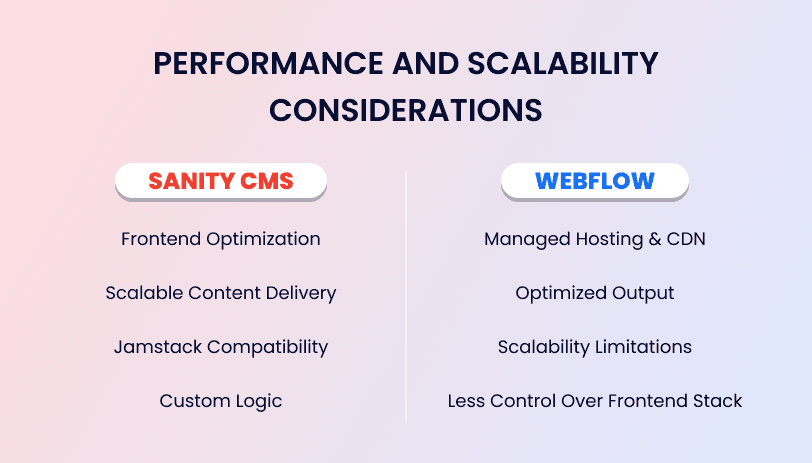
Sanity CMS: Performance Through Decoupling and Jamstack Integration
Sanity's headless nature, when combined with modern frontend frameworks and Jamstack principles, offers significant performance advantages. By decoupling the content from the presentation, developers can implement highly optimized frontends that leverage static site generation (SSG) or server-side rendering (SSR) for speed.
Frontend Optimization: Allows for aggressive caching, optimized image loading, and efficient code splitting on the frontend, leading to faster page load times and better Core Web Vitals.
Scalable Content Delivery: Sanity's global CDN for assets and highly performant APIs ensure content is delivered quickly regardless of traffic volume.
Jamstack Compatibility: Integrates seamlessly with Jamstack workflows, enabling pre-built sites that are inherently faster and more secure. This is a crucial factor for high-performance, scalable solutions.
Custom Logic: The ability to use any backend or serverless functions alongside Sanity allows for custom business logic and integrations that scale independently.
Webflow: Managed Performance and Simplicity
Webflow provides a good baseline for performance through its optimized hosting infrastructure and CDN. For many small to mid-sized websites, this is entirely sufficient. However, it operates within a more constrained environment.
Managed Hosting & CDN: Webflow handles all hosting and CDN aspects, providing reliable performance out-of-the-box for its integrated websites.
Optimized Output: Generates clean HTML/CSS/JS, contributing to good page speed.
Scalability Limitations: While Webflow can handle a significant amount of traffic, its all-in-one nature means that extreme customization for performance or highly dynamic, personalized experiences can be more challenging compared to a headless setup. For very large-scale content operations or highly complex data, its integrated nature can become a limitation.
Less Control Over Frontend Stack: Developers have less granular control over the underlying frontend technologies and build processes, which can limit ultimate performance optimization for highly demanding applications.
Customization and Developer Control
The degree of customization and developer control is a key differentiator, influencing the unique capabilities and long-term adaptability of a platform.
Sanity CMS: Ultimate Developer Freedom and Extensibility
Sanity is built for developers and offers a profound level of control. Everything from the content schema to the editing environment (Sanity Studio) is programmable. This allows teams to create highly specialized content workflows and integrate deeply with existing systems.
Custom Studio: The Sanity Studio is a React application that can be extended with custom plugins, input fields, dashboards, and even entire views. This enables tailored editorial experiences.
Open Source & Community: Sanity's core is open source, fostering a vibrant community and allowing for deep customization and contribution.
API-First: Provides robust APIs (GraphQL, REST, real-time Listen API) for programmatic interaction with content, enabling complex integrations and automation.
Build Your Own Frontend: Developers have complete freedom to choose and optimize their frontend stack, integrating with other services (e-commerce, authentication, search) as needed.
JavaScript-based: Content schemas and Studio customizations are written in JavaScript, making it accessible to a wide range of developers.
Webflow: Visual Customization and Design Control
Webflow excels in visual customization and empowering designers. It provides an intuitive interface to build visually rich, responsive websites without writing code. However, this visual approach inherently places boundaries on programmatic control.
Visual Designer: Offers a powerful visual designer for creating custom layouts, styles, and interactions directly in the browser.
CSS & HTML Control: While visual, Webflow provides granular control over CSS properties and HTML structure within its interface, allowing for highly custom designs.
Limited Code Access: Custom code (HTML embeds, custom JavaScript) can be added, but the core structure and functionality are managed by Webflow. Deep programmatic customization of the underlying platform or content editing experience is limited.
Ecosystem & Integrations: Webflow has a growing ecosystem of integrations and a marketplace, but these are typically less flexible than direct API integrations possible with a headless CMS.
SEO and Digital Marketing Capabilities
Effective SEO is crucial for discoverability. Both platforms offer tools, but their approaches differ.
Sanity CMS: SEO Control at the Content and Frontend Level
With Sanity, SEO capabilities are split between the content layer and the frontend. Sanity manages the structured content, including metadata, while the chosen frontend framework handles rendering and technical SEO best practices.
Structured Metadata: Sanity allows for custom fields for SEO metadata (title tags, meta descriptions, Open Graph data, schema markup) directly within the content model, ensuring content creators can manage it effectively.
Frontend SEO Optimization: The chosen frontend framework (e.g., Next.js, Gatsby) provides full control over technical SEO aspects like sitemaps, robots.txt, canonical tags, server-side rendering, and dynamic routing, which are critical for large, complex sites.
Performance Advantage: The inherent speed benefits of a headless architecture and Jamstack approach contribute positively to SEO rankings.
Webflow: Integrated SEO Tools and Visual Management
Webflow provides a comprehensive suite of integrated SEO tools, making it easy for marketers and designers to manage on-page SEO directly within the platform.
Built-in SEO Settings: Offers intuitive interfaces for managing page titles, meta descriptions, alt text, clean URLs, 301 redirects, and sitemaps.
Automatic Optimization: Webflow automatically generates clean code and ensures responsiveness, which are good for SEO.
Schema Markup: Allows for adding custom schema markup to pages.
Managed Hosting Benefits: Fast hosting and CDN contribute to better page speed, a ranking factor.
Long-Term Cost and Maintenance
Evaluating the total cost of ownership involves more than just subscription fees; it includes development, maintenance, and operational costs.
Sanity CMS: Investment in Development, Flexibility in Operations
The initial investment in a Sanity CMS project typically involves a higher development cost due to the need for custom frontend development and potentially custom Studio plugins. However, long-term operational costs can be highly optimized.
Development Cost: Requires skilled frontend developers familiar with modern frameworks. This initial investment pays off in flexibility and scalability.
Operational Cost: Sanity's pricing is usage-based, scaling with content items, bandwidth, and API requests. For large-scale operations, this can be very efficient. Frontend hosting can also be cost-effective (e.g., Vercel, Netlify).
Maintenance: Maintenance focuses on the frontend application and Sanity Studio customizations. Updates to Sanity itself are managed by the platform.
Future-Proofing: The decoupled architecture offers significant future-proofing, allowing components to be updated or swapped independently without rebuilding the entire system.
Webflow: Simplicity and Predictable Costs for Integrated Solutions
Webflow offers a more streamlined cost structure, especially for teams that prefer an all-in-one solution. Initial development can be faster and potentially less expensive if relying on visual building.
Development Cost: Can be lower for design-centric websites, as it reduces the need for extensive coding. Designers and marketers can contribute significantly.
Operational Cost: Subscription-based pricing often includes hosting, CMS, and basic features. Costs scale with site features and traffic tiers.
Maintenance: Webflow handles platform maintenance and updates. Site maintenance primarily involves content updates and design tweaks.
Scalability Cost: As sites grow in complexity or traffic, higher-tier plans become necessary. For very specific, highly customized needs, the integrated nature might necessitate workarounds or external services, potentially increasing complexity.


Hi, my name is Jaswinder, let's talk about your business needs.
I will do my best to find a reliable solution for you!
Decision Framework: When to Choose Which Platform
The choice between Sanity CMS and Webflow hinges on your organization's specific needs, team capabilities, and long-term strategic vision.
Choose Webflow if:
Your primary need is a visually rich, responsive website: Ideal for marketing sites, portfolios, small e-commerce fronts, or corporate websites where design is paramount.
You prioritize speed of development and launch: Webflow's visual builder allows for rapid prototyping and deployment without extensive coding.
Your team is design-heavy or marketing-focused: Empowers designers and marketers to build and manage websites with minimal developer intervention.
You prefer an all-in-one platform: Integrated design, CMS, and hosting simplify the technology stack and vendor management.
Your content needs are primarily website-specific: Content is mainly for the website and does not require extensive multi-channel distribution or highly complex data models.
Budget is predictable and managed within a subscription model.
Choose Sanity CMS vs Webflow if:
You require ultimate flexibility in content modeling and delivery: Essential for complex data structures, multi-language support, and content reuse across diverse platforms (web, mobile apps, IoT).
Your strategy involves an omnichannel or multi-experience approach: Content needs to be consumed by various frontends and applications.
You demand maximum performance and customizability for the frontend: You need to leverage the latest frontend technologies (e.g., Next.js, Gatsby) for extreme speed, SEO, and user experience.
You have a development team comfortable with modern JavaScript frameworks: The initial development investment is higher, but it provides unparalleled control and extensibility.
Your content workflows are complex and require custom editorial interfaces: Sanity Studio can be tailored precisely to your team's needs.
You need to integrate deeply with other systems: Its API-first nature makes it a powerful hub for connecting e-commerce, CRM, analytics, and other services.
You are building a large-scale, dynamic, and content-heavy platform that needs to evolve significantly over time.
Conclusion
Both Sanity CMS and Webflow are powerful platforms, but they serve different strategic objectives. Webflow shines for design-driven, integrated website development, offering speed and simplicity for teams focused on visual output and quick iterations. It is an excellent choice for many small to mid-sized businesses and marketing departments.
However, for organizations building large-scale, dynamic, and content-heavy digital experiences that require ultimate flexibility, multi-channel delivery, and deep technical control, Sanity CMS emerges as the superior choice. Its headless architecture empowers developers to build highly performant, custom frontends while providing content teams with a robust, adaptable content hub. In 2026, as digital ecosystems become increasingly complex and multi-faceted, the ability to decouple content from presentation, as offered by Sanity CMS, will be a critical enabler for scalable websites and future-proof digital strategies.
At RW Infotech, we specialize in guiding businesses through these strategic technology decisions. Whether you're considering a Headless CMS migration to platforms like Sanity, require Jamstack website development for peak performance, or need comprehensive Full Stack Development to bring your vision to life, our expertise ensures your digital infrastructure is built for scale, performance, and long-term success.
Frequently Asked Questions
Find answers to the most common questions about Sanity CMS vs Webflow: Which Platform Is Better for Scalable Websites.
Yes, you can migrate content from Webflow to Sanity CMS. This typically involves exporting content from Webflow's CMS and importing it into Sanity, then rebuilding the frontend using a framework connected to Sanity.
Sanity CMS can be suitable for small businesses or startups if they have a clear need for content flexibility, plan to scale significantly, or require multi-channel content delivery. However, it often requires more development resources than Webflow initially.
Both platforms offer robust security. Webflow provides integrated security through its managed hosting. Sanity CMS, being headless, allows you to implement security measures independently on your chosen frontend and benefits from a reduced attack surface due to content being delivered via API.
RW Infotech can help by evaluating your specific business needs, long-term goals, and team capabilities to recommend the optimal platform. We provide expertise in Headless CMS migrations, Jamstack development, and Full Stack Development, ensuring a solution tailored for scalability and performance.
News & Insights
We like to share our thoughts on topics we find inspiring. Explore our news and insights.

Legacy PHP Website to Sanity and Next.js: A Step-by-Step Migration Guide
Learn how to migrate a legacy PHP website to Sanity and Next.js step by step, from content modeling and data import to redirects, SEO protection, and launch.
Why Marketing Teams Prefer Headless CMS for Modern Websites
Learn how headless CMS helps marketing teams manage content independently, launch campaigns faster, improve collaboration, personalize customer experiences, and deliver content across multiple channels.