
Select Your Region
Region-Based Optimized Content
How to Implement Backend Logic for Draft + Live Content Previews
Learn how to implement backend logic for draft and live content previews using versioning, secure APIs, staging environments, and real-time preview workflows.

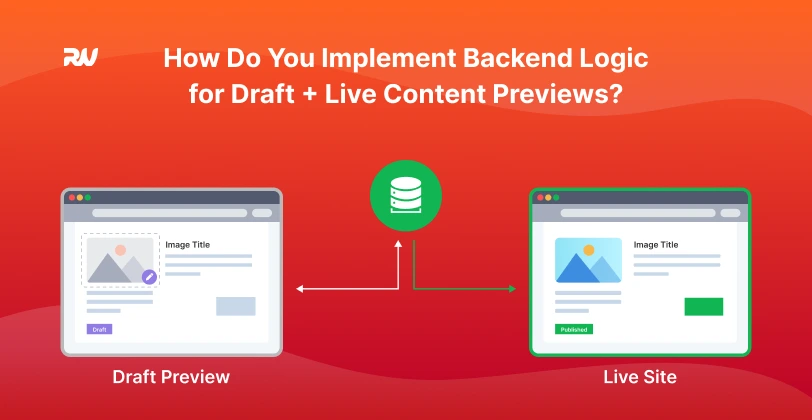
In today's fast-paced digital landscape, content is king, and the ability to manage it efficiently is paramount. For businesses leveraging modern CMS platforms or headless commerce solutions, the challenge often lies in striking a delicate balance: enabling content teams to iterate and refine content without disrupting the live user experience. This isn't just a convenience; it's a strategic imperative for maintaining brand integrity, ensuring accuracy, and accelerating content delivery.
This article will guide developers, digital marketers, and business owners through the intricacies of implementing robust backend logic for draft and live content previews. We'll explore the fundamental concepts, delve into strategic backend architectures, and highlight how a well-designed system not only improves content accuracy and reduces errors but also empowers teams to experiment safely and speed up approval workflows. By the end, you'll have a clear understanding of the best practices for building scalable and maintainable backend designs that keep your live experiences seamless while fostering dynamic content operations.
Key Concepts & Definitions
Before diving into the implementation details, let's establish a common understanding of the core concepts that underpin effective draft and live content management.
Draft Content: This refers to content that is actively being created, edited, or reviewed. It is not yet approved for public consumption and should only be accessible to internal teams for preview and collaboration.
Live Content: Also known as published content, this is the version of your content that is publicly accessible to your website visitors or application users. It represents the approved, finalized state.
Content Preview: The ability to view how draft content will appear on the frontend before it goes live. This is crucial for verifying layout, styling, and overall user experience.
Version Control: A system that records changes to a file or set of files over time so that you can recall specific versions later. In a content context, this allows reverting to previous states or comparing different drafts.
Staging Environment: A replica of your production environment used for testing and previewing changes before deploying them to live. It mirrors the live setup as closely as possible.
API Endpoints: Specific URLs that allow different software systems to communicate. For draft and live content, distinct API endpoints are often used to serve different versions of content.
Headless CMS: A backend-only content management system that stores content and makes it accessible via APIs, decoupling the content from the presentation layer. This architecture is particularly suited for sophisticated preview workflows.
The Strategic Imperative: Why Separate Draft from Live?
The separation of draft and live content is more than a technical detail; it's a strategic decision with profound business implications. Without this clear delineation, content operations become risky, inefficient, and prone to error.
First and foremost, it ensures content accuracy and reduces errors. Imagine a scenario where every edit directly impacts the live site. A typo, a broken link, or an incomplete sentence could immediately diminish user experience and damage brand reputation. By working in a draft environment, content creators can meticulously craft, review, and refine their work without public scrutiny. This iterative process allows for multiple rounds of feedback and corrections before anything reaches the live audience.
Secondly, it significantly speeds up approval workflows. Content teams, editors, and stakeholders can collaborate on drafts, leaving comments and suggesting changes directly within the preview environment. This streamlined feedback loop eliminates the need for cumbersome offline document exchanges and accelerates the time-to-publish for critical updates, campaigns, or new product launches. The ability to visualize changes in real-time fosters quicker decision-making.
Finally, separating draft from live content empowers content teams to experiment safely. A/B testing different headlines, layouts, or calls-to-action becomes feasible without impacting existing user journeys. This fosters innovation and allows for data-driven content optimization, leading to better engagement and conversion rates. It's about creating a sandbox where creativity can flourish without the fear of breaking the live site.
Implementing Backend Logic for Draft + Live Content Previews
Implementing robust backend logic for draft and live content previews requires a thoughtful approach to data modeling, API design, and environmental strategy. Here's how to tackle it.
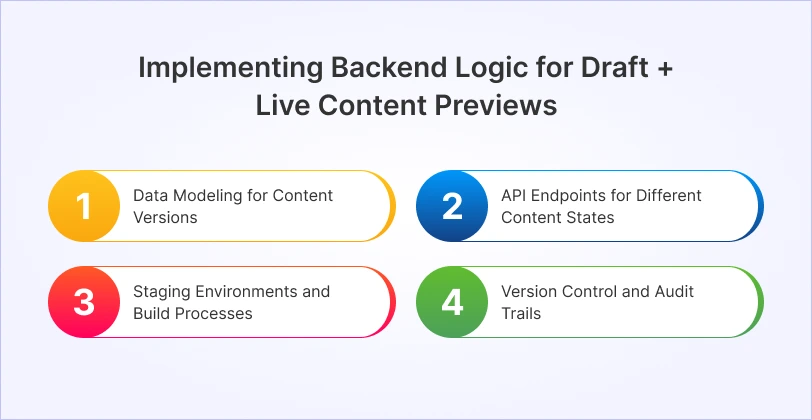
1. Data Modeling for Content Versions
The foundation of any draft/live system is how you model your content in the database. There are several common strategies:
Separate Fields within a Single Document/Entry:
This approach involves adding specific fields to your content entries to denote their status. For example, a content item might have status: 'draft' or status: 'published'. You might also include fields like draft_content and live_content, where draft_content holds pending changes and live_content holds the last published version.
Loading...
Versioned Content with a Status Field:
This is often the most robust approach for complex content operations. Each content modification creates a new version, and each version has a status (e.g., draft, pending_review, published, archived). A specific version is then marked as the "live" version.
Loading...
2. API Endpoints for Different Content States
The API is the bridge between your backend and frontend. You need distinct mechanisms to fetch draft versus live content. This is where API endpoints play a crucial role.
Separate Endpoints:
The most straightforward approach is to have completely separate API endpoints. For example:GET /api/v1/content/live/articles/{slug}for published content.GET /api/v1/content/draft/articles/{id}for draft content.Query Parameters or Headers:
Alternatively, you can use a single endpoint but differentiate content via query parameters or custom HTTP headers:GET /api/v1/content/articles/{slug}?status=liveGET /api/v1/content/articles/{id}?status=draft&preview_token={token}The
preview_tokenis essential for securing draft content, ensuring only authorized users or systems can access it. This token should be short-lived and tied to user sessions or specific preview links.Authentication and Authorization:
Crucially, access to draft content must be restricted. This typically involves:API Keys: For system-to-system communication (e.g., a build process fetching draft content).
JWT (JSON Web Tokens): For user-based authentication, where a logged-in content editor's token grants access to draft endpoints.
Role-Based Access Control (RBAC): Ensuring only users with specific roles (e.g., 'editor', 'admin') can access and modify draft content or trigger publishing.
3. Staging Environments and Build Processes
While API endpoints handle content fetching, staging environments and intelligent build processes are vital for providing a realistic preview experience, especially in a Jamstack context.
Dedicated Staging Environment:
Maintain a staging environment that closely mirrors your production setup. This environment should:Be able to fetch either draft or live content based on configuration.
Have its own separate database or connect to a replica of your content database.
Be accessible only to internal teams.
When a content editor wants to preview changes, they can trigger a build on the staging environment that pulls the latest draft content.
Real-time Preview Workflows:
For a truly seamless experience, especially with headless CMS platforms, real-time previews are key. This often involves:Webhook Triggers: When a content item is saved as a draft, the CMS sends a webhook to your preview service.
On-demand Frontend Builds: The preview service (often a serverless function or dedicated preview server) fetches the draft content via the secure draft API, builds a temporary frontend instance, and provides a unique URL for the preview.
Client-side Rendering for Previews: In some advanced setups, the frontend application itself can be configured to fetch draft content directly when a specific preview mode is activated (e.g., via a URL parameter or user login), rendering it client-side without a full rebuild. This offers the fastest preview experience.
Decoupled Build Process:
For Jamstack sites, your static site generator (SSG) builds the frontend. When publishing live content:The SSG fetches content from the live API endpoints.
The build process generates static HTML, CSS, and JS.
These static assets are deployed to your CDN.
For draft content previews, a similar process occurs, but the SSG fetches from draft API endpoints, and the resulting preview site is deployed to a secure, temporary location or staging environment.
4. Version Control and Audit Trails
Beyond simply having draft and live, a robust system incorporates version control and audit trails. This is critical for compliance, debugging, and maintaining content quality over time.
Content History:
Every significant change to a content item (creation, update, publication, unpublication) should be logged. This history allows you to see who made what changes and when.Revert and Compare:
Users should be able to view previous versions of content, compare them side-by-side with the current draft or live version, and potentially revert to an older state. This prevents accidental data loss and facilitates content recovery.Automated Archiving:
Implement policies to archive old versions of content after a certain period or number of versions to manage database size, while still retaining a historical record.
Practical Examples & Use Cases
Let's look at how these concepts translate into real-world scenarios and the tools that facilitate them.
Example: Headless CMS Integration
Most modern headless CMS platforms inherently support draft and live content states. They typically manage content versions and offer API endpoints for both states.
Content Creation: An editor creates a new blog post in Strapi. It's automatically saved as a
draft.Preview Generation: The editor clicks a "Preview" button in the CMS. This button triggers a webhook to a Vercel/Netlify deployment hook for a preview environment.
Frontend Fetching: The preview environment's Next.js or Gatsby frontend application makes an API call to Strapi's secure draft endpoint (e.g.,
/api/articles?filters[slug][$eq]=my-new-post&publicationState=preview). This request includes an API key or JWT to authorize access to draft content.Live Publishing: Once approved, the editor changes the status to
publishedin Strapi. This triggers another webhook to the production deployment hook, causing the live site to rebuild. The live site's frontend fetches content from Strapi's public live endpoint (e.g.,/api/articles?filters[slug][$eq]=my-new-post&publicationState=live).
Tools like Vercel and Netlify offer native integrations with many headless CMS platforms, providing seamless preview deployments and atomic deploys for live content.
Use Case: E-commerce Product Launches
For an e-commerce platform built with a headless commerce solution (e.g., Shopify Plus, Commercetools) and a custom frontend, draft content is critical for product launches.
Product Setup: Product managers configure new products, descriptions, images, and pricing in the headless commerce backend. These are initially in a "draft" or "inactive" state.
Marketing Previews: Marketing teams need to preview product pages, category listings, and campaign landing pages before launch. They access a staging environment that can query the "draft" product data via specific API parameters (e.g.,
GET /api/products?status=draft&preview_mode=true).Scheduled Launch: On launch day, the product status is updated to "active" or "published" in the backend, often triggered by a scheduled job. The live frontend, which only queries for "active" products, automatically displays the new items. This ensures precise launch timing without manual intervention.
AI Automation and Performance Optimization
The backend logic for draft and live content also ties into advanced capabilities like AI automation and performance optimization. For instance, AI agents can be trained to review draft content for SEO compliance, grammar, or brand voice, providing automated suggestions before human review. This enhances digital marketing for headless websites by ensuring content quality from the outset.
Performance optimization benefits from this separation by allowing the live site to serve highly optimized, cached content, while draft content, which changes frequently, might be served with less aggressive caching or directly from the content source for real-time feedback. This ensures that the live user experience remains lightning-fast, a core tenet of Jamstack website development.


Hi, my name is Jaswinder, let's talk about your business needs.
I will do my best to find a reliable solution for you!
Conclusion
Implementing robust backend logic for draft and live content previews is not merely a technical requirement; it's a strategic investment that empowers content teams, accelerates workflows, and safeguards the integrity of your digital presence. By carefully designing your data models, securing your API endpoints, and leveraging intelligent staging and build processes, you can create a content management ecosystem that is both flexible and resilient.
This separation ensures that content creators can innovate and iterate without fear, knowing that the live site remains stable and error-free. It streamlines collaboration, reduces time-to-market for critical content, and ultimately delivers a superior experience to your end-users. Embracing these practices positions your organization for scalable content operations and competitive advantage in a dynamic digital world.
At RW Infotech, we specialize in architecting and implementing sophisticated content solutions, including Headless CMS migrations and Jamstack website development, that inherently support advanced draft and live preview workflows. Our expertise in Full Stack Development, coupled with a deep understanding of AI automation and performance optimization, allows us to build custom backend systems that provide seamless content management, from initial draft to global deployment. If you're looking to transform your content operations and empower your teams with cutting-edge capabilities, connect with us to explore how we can help you implement backend logic for draft + live content previews that drives real business value.
Frequently Asked Questions
Find answers to the most common questions about backend logic for draft and live content previews.
Draft content APIs can leak unapproved or sensitive data if not secured. Use strong authentication (OAuth/JWT), RBAC, short-lived preview tokens, HTTPS, and restrict access (IP whitelisting) for safety.
A staging environment is a full site copy and usually updates on scheduled/manual builds. Real-time preview updates instantly after content changes and shows only draft updates without a full rebuild.
Yes. A single database works well when using status fields or versioned content. The backend serves draft or live content based on request type, keeping data consistent and easier to manage.
Webhooks automate preview and publishing workflows. They trigger preview builds when drafts are saved and trigger live deployments or cache refresh when content is published or updated.
News & Insights
We like to share our thoughts on topics we find inspiring. Explore our news and insights.