
Select Your Region
Region-Based Optimized Content
How to Auto Assign Support Tickets from Chatbot to Tech Team in Strapi
Learn how to auto-assign support tickets from chatbot to tech team in Strapi using AI, workflow automation, n8n, and Make for faster support operations.


Automating support ticket assignment is a critical step for businesses aiming to enhance operational efficiency and customer satisfaction. This guide details how to auto-assign support tickets from a chatbot to a tech team using Strapi as the central content and data management system. By integrating AI for intent detection and workflow automation tools, organizations can streamline their support processes, reduce manual intervention, and accelerate resolution times.
The objective is to create a robust, scalable system where customer queries initiated through a chatbot are intelligently analyzed, categorized, and routed to the most appropriate technical team member or department within Strapi. This approach ensures that every support request is handled efficiently, improving both internal team productivity and the customer experience.
Strategic Approach to Automated Ticket Assignment
Implementing an automated ticket assignment system requires careful planning, integrating several key technologies. The core components include a chatbot for initial customer interaction, AI for understanding query intent, Strapi for ticket management, and an automation platform to orchestrate the workflow. This setup transforms raw customer inquiries into actionable, assigned tickets without human intervention.
Understanding the Workflow Components
Chatbot Integration: The primary interface for customer interaction. The chatbot captures initial query details and serves as the trigger for the automation process.
AI for Intent Detection and Classification: Natural Language Processing (NLP) models analyze chatbot conversations to identify the issue type, urgency, and specific product or service related to the query. This intelligence is crucial for accurate routing.
Strapi as the Ticket Management System: Strapi provides a flexible, API-driven backend for creating, storing, and managing support tickets. Its customizable content types allow for defining specific fields for ticket details, status, assignee, and priority.
Workflow Automation Platform: Tools like n8n or Make (formerly Integromat) act as the glue, connecting the chatbot, AI, and Strapi. These platforms define the logic for processing data, making API calls, and triggering actions based on predefined rules.
The strategic decision to use Strapi as the central hub offers significant advantages. Its headless architecture ensures that the ticket management system is decoupled from the frontend, allowing for flexible integration with various chatbots and internal dashboards. This separation also supports future scalability and the ability to adapt to evolving business needs without rebuilding the entire system.
Decision Criteria for Technology Selection
Choosing the right technologies for each component is paramount. For AI, consider factors such as accuracy in intent recognition, language support, and ease of integration. Services like Google Cloud Natural Language API, AWS Comprehend, or custom-trained models using frameworks like spaCy or Hugging Face can be evaluated. The decision depends on the complexity of customer queries and the desired level of granularity in classification.
For the automation platform, evaluate based on connector availability, visual workflow builder capabilities, scalability, and cost. Platforms like n8n offer self-hosting options for greater control over data privacy and infrastructure, while Make provides a robust cloud-based solution with extensive third-party integrations. The choice should align with the organization's existing infrastructure, technical expertise, and compliance requirements.
Strapi's flexibility makes it an ideal choice for the ticket management system due to its open-source nature, REST and GraphQL API support, and intuitive admin panel. Its custom content types allow businesses to define a ticket schema that precisely matches their operational needs, including fields for customer ID, issue description, severity, assigned team, and resolution notes.
Implementing Automated Ticket Assignment in Strapi
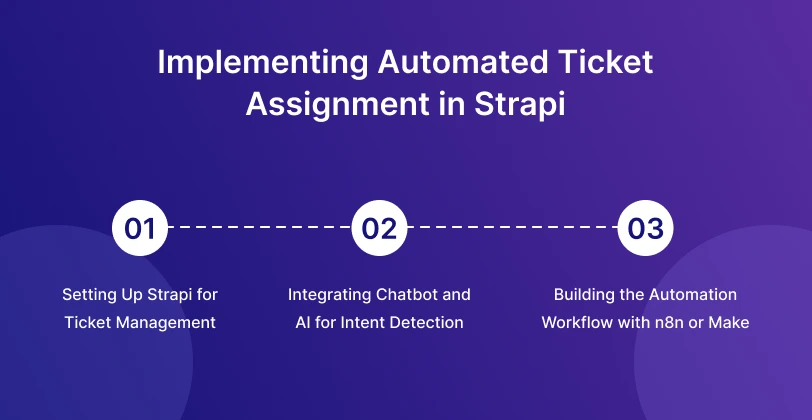
The implementation involves setting up the chatbot, configuring AI for analysis, designing the Strapi content model, and building the automation workflow. Each step requires careful attention to detail to ensure a seamless and efficient process.
1. Setting Up Strapi for Ticket Management
First, create a "Ticket" content type in Strapi. This content type will define the structure of your support tickets. Essential fields typically include:
title(Text): A brief summary of the issue.description(Rich Text): Detailed explanation of the customer's problem.status(Enumeration): e.g.,New,Assigned,In Progress,Resolved,Closed.priority(Enumeration): e.g.,Low,Medium,High,Critical.issueType(Enumeration): e.g.,Technical Support,Billing,Feature Request,Bug Report.assignedTeam(Relation to a "Team" content type or Enumeration): The specific tech team responsible for the ticket.customerEmail(Email): Customer's email for communication.chatbotSessionId(Text): Unique ID to link back to the chatbot conversation.createdAt(DateTime): Automatic timestamp.
Additionally, consider creating a "Team" content type to manage your tech teams and their members. This allows for dynamic assignment and better organization. Ensure appropriate permissions are set in Strapi to allow the automation platform to create and update tickets via API.
2. Integrating Chatbot and AI for Intent Detection
The chatbot needs to capture customer input and then pass it to an AI service for analysis. For instance, a user might type: "My website is down and I can't access the admin panel." The AI's role is to parse this input and determine:
Intent:
Technical SupportIssue Type:
Website Down,Admin Access IssuePriority: Potentially
HighorCriticalbased on keywords like "down."
This analysis can be performed using various AI services. For a custom solution, train an NLP model with examples of common customer queries and their corresponding issue types and priorities. The chatbot then sends the customer's message to this AI service, receives the classified data, and passes it to the automation platform.
3. Building the Automation Workflow with n8n or Make
This is where the orchestration happens. The workflow typically follows these steps:
Trigger: A new message or conversation completion event from the chatbot. The chatbot sends a webhook payload containing the customer's query and any initial AI analysis.
AI Processing (if not done by chatbot): If the chatbot doesn't perform AI analysis, the automation platform calls an external AI service (e.g., Google Cloud Natural Language API) with the customer's message.
Data Extraction and Transformation: Extract relevant fields from the AI's response, such as
issueType,priority, andcustomerEmail. Map these to the fields defined in your Strapi "Ticket" content type.Conditional Logic for Team Assignment: Implement rules to assign the ticket to the correct tech team based on the
issueTypeandpriority. For example:
Loading...
This logic can be as simple or complex as needed, potentially involving multiple conditions and fallbacks.
Create Ticket in Strapi: Make an HTTP POST request to your Strapi API endpoint (e.g.,
/api/tickets) with the extracted and transformed data. This creates a new ticket entry in Strapi.Notifications: Send notifications to the assigned tech team (e.g., via Slack, email, or Microsoft Teams) about the new ticket, including a direct link to the ticket in Strapi's admin panel.
Chatbot Response: Send a confirmation message back to the customer via the chatbot, acknowledging receipt of their request and providing a ticket ID.
This comprehensive workflow ensures that every customer query is automatically processed, categorized, and assigned, reducing the load on support staff and improving response times. The ability to auto-assign support tickets from a chatbot to a tech team in Strapi transforms reactive support into a proactive, intelligent system.


Hi, my name is Jaswinder, let's talk about your business needs.
I will do my best to find a reliable solution for you!
Trade-offs, Risks, and Long-Term Implications
While automating ticket assignment offers significant benefits, it's crucial to consider the potential trade-offs and risks, along with the long-term implications for your support operations.
1. Trade-offs
Initial Setup Complexity: Integrating multiple systems (chatbot, AI, automation platform, Strapi) requires technical expertise and careful configuration. The initial investment in time and resources can be substantial.
Dependency on AI Accuracy: The effectiveness of the system heavily relies on the AI's ability to accurately interpret customer intent. Misclassifications can lead to incorrect assignments and delays, potentially frustrating customers and support teams.
Maintenance Overhead: Workflows and AI models may need periodic adjustments as business processes evolve, new products are introduced, or customer query patterns change. This requires ongoing monitoring and maintenance.
2. Risks
"Black Box" Problem with AI: Understanding why an AI model made a particular classification can be challenging, making debugging difficult when assignments are incorrect.
Security and Data Privacy: Ensure that data passed between the chatbot, AI services, and Strapi is handled securely and complies with relevant data protection regulations (e.g., GDPR, HIPAA). API keys and sensitive customer information must be protected.
Over-Automation Leading to Poor CX: While automation is good, over-reliance without human oversight can lead to impersonal interactions or failure to address nuanced customer issues that AI might misinterpret. A clear escalation path to human agents is vital.
3. Long-Term Implications
Scalability: A well-designed automated system scales effortlessly with increased query volumes. As your business grows, the system can handle more tickets without a proportional increase in human staff for initial routing.
Improved Data Analytics: Centralized ticket data in Strapi, enriched with AI classifications, provides valuable insights into common issues, peak support times, and team performance. This data can drive product improvements and strategic decisions.
Enhanced Employee Satisfaction: By removing repetitive, manual ticket routing tasks, support agents can focus on solving complex problems, leading to higher job satisfaction and better utilization of their skills.
Faster Resolution Times: Accurate and immediate assignment to the correct team significantly reduces the time from query initiation to resolution, boosting customer satisfaction.
Consistency in Service: Automation ensures that every ticket follows the same routing logic, providing a consistent and predictable support experience for customers.
Considering these factors, organizations should adopt a phased approach, starting with simpler automation rules and gradually increasing complexity as confidence in the system grows. Regular monitoring and feedback loops from support teams are essential for continuous improvement.
Conclusion
Automating the assignment of support tickets from a chatbot to a tech team in Strapi represents a significant leap in operational efficiency and customer service quality. By strategically integrating AI for intent detection with robust workflow automation platforms and Strapi's flexible content management capabilities, businesses can transform their support processes. This setup not only reduces manual overhead and accelerates resolution times but also provides a scalable foundation for handling evolving customer demands. The long-term benefits include enhanced customer satisfaction, better resource utilization, and invaluable data insights that drive continuous improvement across the organization.
RW Infotech specializes in developing headless solutions, AI automation, and full-stack applications. Our expertise in Strapi development and workflow automation can help your team design and implement a tailored support ticket automation system, ensuring a seamless integration and optimal performance aligned with your business objectives.
Frequently Asked Questions
Find answers to the most common questions about How to Auto Assign Support Tickets from Chatbot to Tech Team in Strapi.
For intent detection, services like Google Cloud Natural Language API, AWS Comprehend, or Azure Cognitive Services are highly effective. For custom needs, open-source libraries such as spaCy or Hugging Face Transformers can be used to train specialized models.
Yes, many AI services offer multi-language support for intent detection. Ensure your chosen chatbot and AI platform are configured to process and analyze queries in the languages your customers use.
Implement secure API keys, use encrypted communication (HTTPS), and ensure all integrated services comply with data protection regulations relevant to your region (e.g., GDPR, CCPA). Regularly audit access controls for Strapi and automation platforms.
Implement a mechanism for human agents to easily reassign or correct misclassified tickets within Strapi. Also, establish a feedback loop to retrain your AI model periodically with corrected data to improve accuracy over time.
RW Infotech offers expertise in headless solutions, Strapi development, and AI automation. We can assist in designing the Strapi content model, integrating AI services for intent detection, and building robust automation workflows using platforms like n8n or Make to streamline your support operations.
News & Insights
We like to share our thoughts on topics we find inspiring. Explore our news and insights.

Why Marketing Teams Prefer Headless CMS for Modern Websites
Learn how headless CMS helps marketing teams manage content independently, launch campaigns faster, improve collaboration, personalize customer experiences, and deliver content across multiple channels.
Which Headless CMS Is Best for Content-Heavy Websites in 2026?
Discover the best headless CMS platforms for content-heavy websites in 2026. Compare Sanity, Strapi, Contentful, Storyblok, Directus, and other leading options.