
Select Your Region
Region-Based Optimized Content
What is MCP? A Simple Explanation for Beginners (2026)
Learn what MCP (Model Context Protocol) is, how it works and how it connects AI to Gmail, Slack and Google Sheets. A simple beginner guide for business teams.

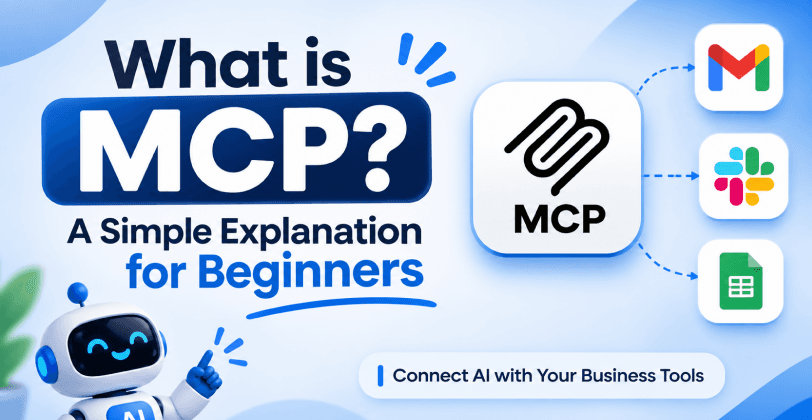
MCP, short for Model Context Protocol, is a simple standard that lets AI assistants connect to the tools you already use, like Gmail, Slack and Google Sheets. Anthropic introduced it in November 2024, and many AI companies and software makers have adopted it since.
Why Everyone Is Talking About MCP
AI chatbots are smart, but on their own they are cut off from your real work. They cannot see your inbox, your team chat or your spreadsheets unless someone builds a custom connection for each one. MCP removes that problem with one common way to connect AI to tools.
In this guide you will learn what MCP is, how it works, how it connects AI to your business tools, and how to get started safely. No technical background is needed.
What Is MCP in Simple Words?
MCP is a universal connector between AI and software tools. Think of the USB-C port on your phone: one standard plug works with chargers, laptops and headphones. MCP does the same for AI, so one standard plug works with email, chat, spreadsheets, databases and more.
Before MCP, every connection between an AI app and a tool had to be built from scratch. If you had 5 AI apps and 10 tools, that could mean 50 separate integrations. With MCP, each tool is connected once, and any MCP-ready AI app can use it.
A Restaurant Analogy
Imagine a restaurant. You (the AI) are the customer. The kitchen is your business tool, such as Gmail. The waiter is MCP. You do not walk into the kitchen. You read the menu, tell the waiter what you want, and the waiter brings it back. MCP is the waiter that carries requests and answers between the AI and your tools in a clear, safe and standard way.
Where Did MCP Come From?
Anthropic, the company behind Claude, introduced MCP in November 2024 as an open standard. Open means anyone can use it for free, without asking permission. Over the following months, other major AI companies and software makers added MCP support to their products, and the standard now has its own growing community of developers and a large library of ready-made connectors.
This wide support is the main reason MCP matters. When many AI apps and many tools speak the same language, businesses are not locked into one vendor, and a connector built once can be reused again and again.
How Does MCP Work?
MCP has three simple parts, and each one has an easy job.
The AI app (the client). This is the assistant you talk to, such as Claude. It asks for things like "find my last email from the vendor."
The MCP server. This is a small connector built for one tool, such as Gmail or Google Sheets. It knows how to talk to that tool.
The tools. These are the actions the server offers, such as "search emails," "send a message" or "read a spreadsheet row."
When you ask a question, the AI checks which tools are available, picks the right one, and sends the request through MCP. The server does the work in your tool and returns the result. The AI then explains it to you in plain language.
MCP Terms in Plain English
You will see a few words again and again when people talk about MCP. Here is what they mean.
Client: the AI app that sends requests, like Claude or another AI assistant.
Server: the connector for one tool, like a Gmail or Google Sheets connector.
Tool: one action the server can perform, like "search emails" or "add a row."
Resource: data the AI can read, like a document, a file or a database record.
Prompt: a ready-made instruction template, like "Summarize this week's sales."
You do not need to remember all of these. The key idea is simple: the client asks, the server acts, and the tool does the actual work.
How MCP Helps AI Work With Your Business Tools (Gmail, Slack, Google Sheets)
The real value of MCP shows when AI can work inside the apps your team uses every day. Instead of copying and pasting between tabs, you ask in plain English and the AI does the steps for you.
Gmail: Handle Email Faster
With a Gmail connection, an AI assistant can search your inbox, summarize long threads and draft replies.
"Find all emails from this client in the last month and summarize them."
"Draft a polite reply asking for the invoice by Friday."
You stay in control. You review the draft before anything is sent.
Slack: Stay on Top of Team Chat
With a Slack connection, the AI can read channels, find past decisions and post updates.
"What did the team decide about the website launch this week?"
"Post a short status update in the project channel."
Google Sheets: Work With Your Data
With a Google Sheets connection, the AI can read, add and update rows, so you do not need to write formulas or scripts.
"Show me the top 5 customers by revenue from this sheet."
"Add today's new leads to the tracker."
All Three Together
The biggest benefit appears when tools work together. You could say: "Check this week's leads in Google Sheets, write a follow-up email in Gmail for each one, and tell the sales team on Slack when the drafts are ready." Without MCP, that takes several manual steps across three apps. With MCP, one request is enough.
Why This Matters for Your Business
Saves time. Repetitive tasks like reporting, follow-ups and data lookups take minutes instead of hours.
Fewer mistakes. The AI reads live data instead of relying on copied numbers.
No tab switching. Your team asks once, in one place.
Easy to grow. Adding a new tool later means adding one more MCP connection.
More Ways Businesses Use MCP
Gmail, Slack and Google Sheets are only the start. The same idea works for almost any business system.
Online stores. AI shopping agents can read product data and answer buyer questions. We explain the setup step by step in our guide on how to connect AI shopping agents to your ecommerce store using MCP.
Website content. Marketing teams can ask AI to find, draft or update content, which is why every headless CMS will need an MCP server in 2026.
Customer support. AI can look up an order, check a customer's history and suggest a reply, all from one question.
Reporting. AI can pull numbers from several tools and write a weekly summary for the team.
Internal tools. A custom MCP server can connect your CRM, ERP or internal database to AI in a controlled way.
When you want these tools to run on their own, without anyone typing a request, you can combine MCP with workflow automation. Our n8n automation service helps teams build automated workflows that connect their apps and run on a schedule or a trigger.
MCP vs API: What Is the Difference?
An API is a way for one piece of software to talk to another, and MCP is built on a similar idea. The difference is who it is designed for. APIs are written for developers, while MCP is designed so AI can discover and use tools on its own.
Built for: APIs serve developers writing code, while MCP serves AI assistants.
Setup: APIs need custom code for every tool, while MCP gives one standard way for every tool.
Discovery: With an API, a developer reads the docs. With MCP, the AI asks the server what it can do.
Typical use: APIs connect apps to apps, while MCP lets AI use apps for you.
MCP does not replace APIs. Most MCP servers use a tool's API behind the scenes and add a standard layer on top.
Is MCP Safe? Basic Security Tips
MCP is safe when it is set up with care, because you are giving an AI access to real business data. A few simple habits go a long way.
Give the least access needed. If the AI only needs to read a sheet, do not let it edit or delete.
Use trusted servers only. Install MCP connectors from official or well-known sources.
Keep a human in the loop. Review emails and messages before they are sent.
Use proper sign-in. Connect through your tool's secure login, and never paste passwords into a chat.
Review access regularly. Remove connections your team no longer uses.
The MCP standard keeps improving its authorization and security features, so it is worth following updates as the protocol matures.
Questions to Ask Before You Connect a Tool
Who built this connector, and can I trust the source?
What data will the AI be able to see?
Can I limit it to read-only access?
Will actions like sending or deleting need my approval?
Who in my team can turn this connection on or off?
If you can answer these five questions, you are already ahead of most teams.


Hi, my name is Jaswinder, let's talk about your business needs.
I will do my best to find a reliable solution for you!
How to Get Started With MCP
You do not need a big tech team to begin. Start small and grow step by step.
Pick one task. Choose a repetitive job, like weekly reporting or email follow-ups.
Choose an MCP-ready AI app. Several popular AI assistants already support MCP connections.
Connect one tool. Start with something simple, like Google Sheets or Gmail.
Test with low-risk requests. Try read-only questions first before allowing changes.
Add more tools. Once it works, connect Slack and other apps your team uses.
If your tools do not have a ready-made MCP connector, a developer can build a custom MCP server for your CRM, ERP or internal system.
Budget is a common worry, so it helps to plan early. Our article on what AI integration costs for a business website explains the main cost factors in simple terms.
Conclusion
MCP gives AI a standard, simple way to work with your business tools. It turns an assistant that only talks into one that can help with Gmail, Slack, Google Sheets and much more.
At RW Infotech, we help businesses build AI solutions and custom MCP integrations. Contact our team to find out how MCP can save your team time.
Frequently Asked Questions
Find answers to the most common questions about What is MCP
No. Developers build the connectors, but anyone can use them through an AI assistant by typing normal requests.
The MCP standard is open and free to use. The AI app or the tool you connect may have its own pricing.
Yes. A custom MCP server can be built for internal systems like a CRM, ERP or database.
Only if you allow it. You can limit access to read-only and require approval for actions.
News & Insights
We like to share our thoughts on topics we find inspiring. Explore our news and insights.
Laravel vs Next.js: Which Framework Should You Choose for Your Next Business Website?
Laravel or Next.js for your business website? A practical comparison of speed, SEO, scalability and cost, and why Next.js with a headless CMS suits most businesses.
Why It Is Time to Move from WordPress to a Headless CMS in 2026
WordPress plugin flaws, a critical core bug in July 2026 and PHP end of life are raising the cost of staying put. Here is why teams are moving to headless.